

Business administration keeps organizations running—but it’s often bogged down by repetitive, time-consuming tasks. AI transforms this essential function by automating routine work, reducing errors, and freeing admins to focus on strategic support. From scheduling to records management, here’s how to apply AI to make business administration faster, smarter, and more proactive.
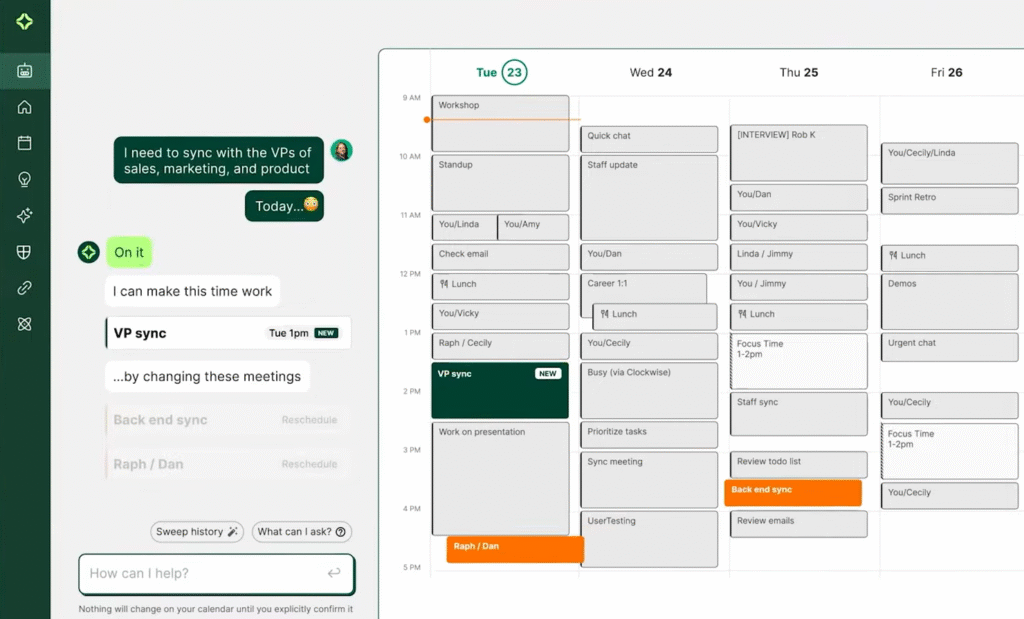
1. Automate Scheduling & Calendar Management
Stop playing email ping-pong to find meeting times:
- AI schedulers like Microsoft Copilot in Outlook, x.ai (Amy/Andrew), or Calendly + AI analyze participants’ calendars, time zones, and preferences to propose optimal slots.
- They handle rescheduling, send reminders, and even join calls to take notes (via Fireflies.ai or Otter.ai).
Result: Save 5–10 hours/week on coordination alone.
2. Digitize & Organize Documents with AI
Turn paper chaos into searchable digital records:
- AI-powered OCR (Optical Character Recognition) in Adobe Scan, Google Drive, or Microsoft OneNote converts scanned invoices, contracts, or forms into editable, searchable text.
- Smart filing: Tools like Notion AI or M-Files auto-tag and categorize documents (“Invoice,” “HR Policy,” “Client Contract”) based on content.
- Compliance alerts: AI flags expired licenses, unsigned agreements, or missing W-9s.
This eliminates “Where’s that file?” moments and audit stress.
3. Streamline Communication & Email Management
AI helps you stay on top of inboxes and messages:
- Smart sorting: Gmail’s Priority Inbox or Microsoft Viva uses AI to highlight urgent emails and mute newsletters.
- Drafting assistance: Grammarly, Microsoft Copilot, or Wordtune suggest professional replies in seconds:“Thanks for your note. I’ve attached the Q2 report and will follow up Thursday.”
- Meeting follow-ups: AI transcribes calls and auto-generates action items (“John to send budget by Friday”).
Admins become communication hubs—not bottlenecks.
4. Automate Approvals & Workflow Routing
Speed up routine requests without manual chasing:
- AI workflow tools like Zapier, Microsoft Power Automate, or Kissflow auto-route forms:
- Expense reports → Finance
- Time-off requests → HR
- Purchase orders → Manager
- AI checks for completeness (e.g., “Receipt missing”) before submission.
This cuts approval cycles from days to hours.
5. Ensure Compliance & Reduce Risk
AI acts as a vigilant compliance partner:
- Policy monitoring: Tools like Guru or Slite AI alert employees when they reference outdated procedures.
- Data privacy: AI scans documents for PII (Personally Identifiable Information) before sharing externally.
- Audit trails: Platforms like DocuSign + AI track who viewed, signed, or edited a document—and when.
This minimizes legal and regulatory exposure.
FAQs
Q: Do I need technical skills to use AI in administration?
A: No. Most tools (Calendly, Grammarly, Adobe Scan) are no-code and designed for everyday users. If you can use email and Word, you can use AI admin tools.
Q: Are these tools expensive?
A: Many offer free tiers (Google Drive OCR, Grammarly) or start under $15/user/month. The time saved usually pays for the tool in days.
Q: Will AI replace administrative roles?
A: No—it elevates them. By automating routine tasks, AI frees admins to focus on strategic coordination, relationship management, and process improvement—the human skills that matter most.
AI in business administration isn’t about replacing people—it’s about removing friction so your team can operate at its best. By handling the mundane, AI empowers administrative professionals to become proactive enablers of productivity, compliance, and collaboration. Start with one tool that solves your biggest daily headache, and watch efficiency—and job satisfaction—soar.