

Business analysis is evolving from retrospective reporting to real-time, predictive intelligence—and AI is the catalyst. Whether you’re a solo analyst or part of a strategy team, AI too ls can automate data wrangling, reveal hidden patterns, and turn complex datasets into clear, actionable recommendations. Here’s how to integrate AI into your business analysis workflow—practically and powerfully.
1. Automate Data Collection & Cleaning
Up to 80% of an analyst’s time is spent preparing data. AI slashes this:
- Tools like Microsoft Power Query (with AI insights), Tableau Prep, or Trifacta auto-detect data types, fix inconsistencies, and fill gaps using smart imputation.
- AI-powered connectors (e.g., in Power BI or Google Looker Studio) pull live data from CRMs, ERPs, and marketing platforms without manual exports.
Result: Spend minutes—not days—getting data ready for analysis.

2. Uncover Hidden Patterns with AI-Powered Analytics
Go beyond basic charts. AI detects what humans miss:
- Anomaly detection: Spot sudden drops in sales or unusual expenses (e.g., Power BI’s anomaly detection, Anaplan).
- Clustering: Automatically segment customers by behavior (e.g., “High-value but at-risk” vs. “Loyal bargain hunters”).
- Natural Language Queries: Ask questions like “Show me top-performing products in Q2” and get instant visual answers (via Qlik Sense, ThoughtSpot, or Tableau Ask Data).
This turns raw numbers into strategic narratives.
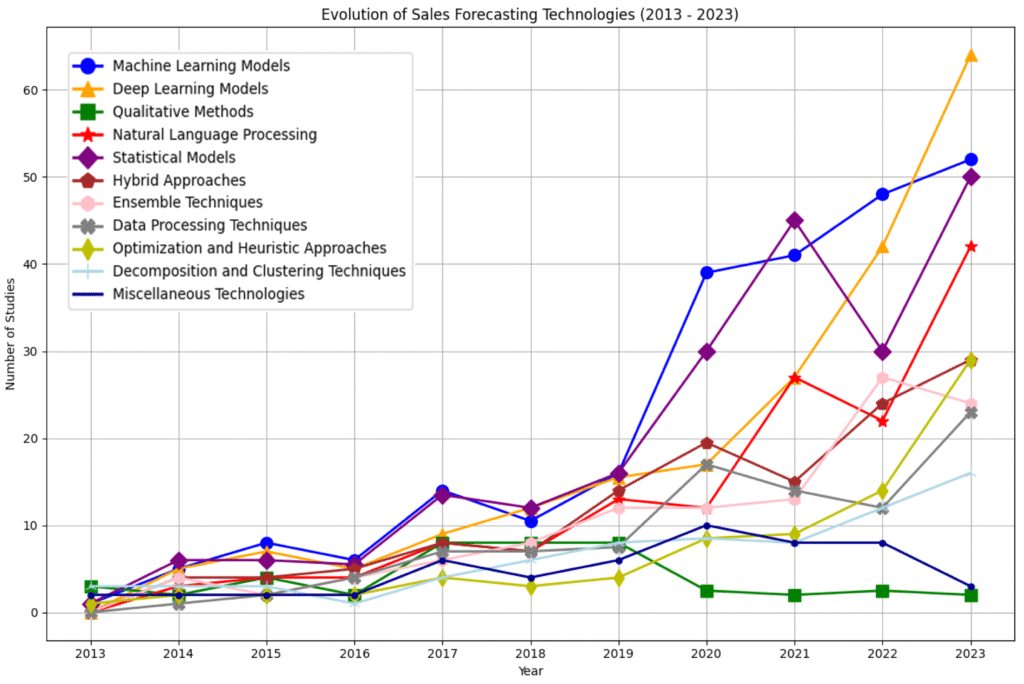
3. Predict Outcomes with Forecasting Models
Move from “what happened” to “what’s next”:
- AI forecasting in Excel (Forecast Sheet), Power BI, or Sisense predicts sales, churn, or inventory needs using historical trends and external factors (e.g., seasonality, market shifts).
- Scenario modeling: Test “What if we raise prices by 10%?” or “What if supply delays hit Q3?”—AI simulates outcomes instantly.
Example:
AI model predicts 18% churn risk in Segment B → team launches retention campaign → saves $250K in lost revenue.
4. Generate Insights & Reports Automatically
Stop writing repetitive summaries. AI drafts them for you:
- Power BI’s “Key Influencers” visual explains why metrics changed (“Sales dropped because Region X underperformed”).
- Tools like Narrative Science (now part of Salesforce) or Microsoft Copilot in Power BI auto-generate plain-English summaries of dashboards.
- Chat-based analytics (e.g., Sigma Computing, Domo) let stakeholders ask questions in natural language and get instant answers.
This democratizes data—so everyone, not just analysts, can act on insights.
5. Enhance Decision-Making with Prescriptive AI
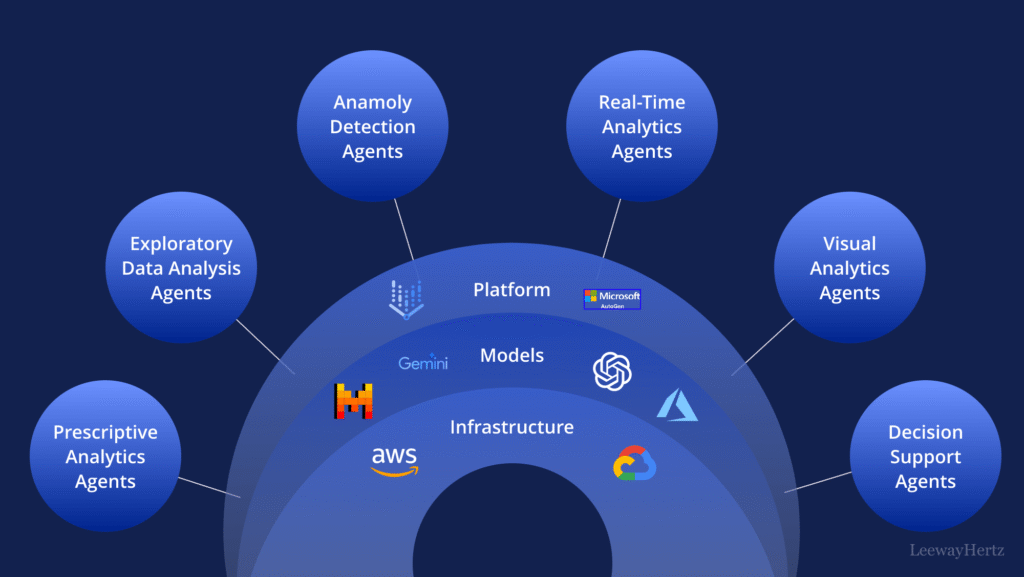
The next frontier: AI doesn’t just explain—it recommends:
- Prescriptive analytics (in platforms like SAP Analytics Cloud or IBM Watson) suggests actions: “To hit Q3 target, increase outreach to Segment C by 30%.”
- Optimization engines recommend resource allocation, pricing, or campaign mix for maximum ROI.
This turns analysis into execution.
FAQs
Q: Do I need to know machine learning to use AI in business analysis?
A: No. Modern BI tools embed AI features with simple UIs—no coding required. Focus on asking the right questions, not building models.
Q: Is AI accurate enough for critical business decisions?
A: AI augments—not replaces—human judgment. Always validate predictions with domain knowledge and test recommendations on a small scale first.
Q: What’s the best tool to start with?
A: If you use Microsoft 365, start with Power BI + Copilot. Google users can explore Looker Studio + AI insights. Both are low-cost and integrate with existing workflows.
AI transforms business analysis from a rearview mirror into a GPS for your organization’s future. By automating routine tasks, revealing deep insights, and forecasting with confidence, AI empowers analysts to become strategic advisors—not just data reporters. Start with one AI feature in your current stack, measure its impact, and scale from there. The future of analysis isn’t just smarter—it’s proactive, predictive, and profoundly human-led.