

Microsoft Dynamics 365 Business Central isn’t just an ERP—it’s an intelligent operations hub. With native AI and Microsoft Copilot deeply integrated, Business Central helps small and mid-sized businesses predict cash flow, automate routine tasks, and make faster decisions—all within the familiar interface you already use for finance, sales, and inventory. Here’s how to leverage AI in Business Central to work smarter, not harder.
1. Forecast Cash Flow with AI-Powered Predictions
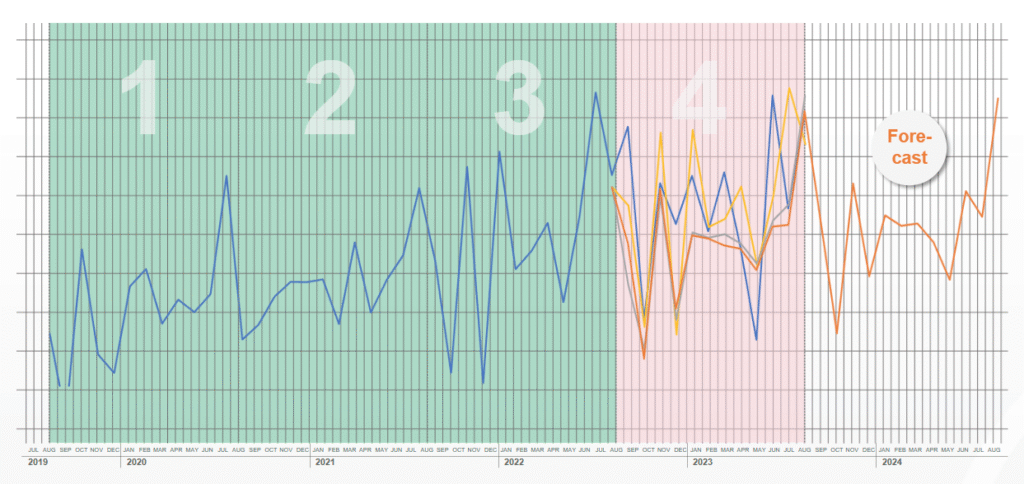
Stop guessing your financial future. Business Central’s AI-driven cash flow forecasting analyzes historical transactions, payment terms, and vendor/customer behavior to predict inflows and outflows up to 12 months ahead.
- View “Projected Cash Flow” in the Finance dashboard
- Adjust assumptions (e.g., “What if sales grow 15%?”) and see real-time updates
- Get alerts for potential shortfalls: “Low cash expected on June 12—consider delaying non-essential payments”
Result: Proactive financial planning without spreadsheets or manual modeling.
2. Automate Routine Tasks with Smart Notifications
AI surfaces what matters—so you don’t miss critical actions:
- Smart notifications appear on your Role Center:
- “Purchase order #1042 is late—vendor hasn’t shipped”
- “Customer invoice overdue by 10 days”
- “Inventory for Product X is below safety stock”
- Click to act instantly—approve, follow up, or reorder—without digging through menus.
This turns reactive firefighting into proactive management.
3. Get Answers Instantly with Copilot in Business Central
Microsoft Copilot brings natural language intelligence directly into your workflow:
- Ask questions in plain English:
- “Show me top 5 customers by revenue last quarter”
- “Why did COGS increase in April?”
- “Create a sales quote for Contoso Ltd for 50 units of Item A”
- Copilot retrieves data, explains trends, and even creates records (quotes, orders, journals) on your behalf.
No more memorizing report paths or writing filters.
4. Optimize Inventory & Purchasing
AI helps you stock smarter:
- Demand forecasting: Predicts future item needs based on sales history, seasonality, and trends
- Reorder suggestions: Recommends when and how much to order to avoid stockouts or overstock
- Vendor performance insights: Flags unreliable suppliers based on on-time delivery history
Example:
AI suggests increasing Widget inventory by 30% ahead of summer peak—reducing lost sales by an estimated $18K.
5. Streamline Month-End Close & Compliance
AI reduces manual effort in finance:
- Automated bank reconciliation: AI matches transactions with 95%+ accuracy
- Anomaly detection: Flags unusual journal entries or duplicate invoices
- Audit-ready documentation: Copilot can summarize financial activity for compliance reports
This cuts closing time from days to hours.
FAQs
Q: Do I need a separate AI license to use these features?
A: Basic AI features (cash flow forecast, smart notifications) are included in Business Central Premium. Copilot capabilities require a Microsoft 365 Copilot license ($30/user/month) and Business Central 2023 Wave 2 or later.
Q: Is my financial data safe with AI in Business Central?
A: Yes. AI runs within Microsoft’s secure, compliant cloud (GDPR, ISO 27001). Copilot only accesses data you already have permission to see—no external sharing.
Q: Can I use AI if I’m on an older version of Business Central?
A: Core AI features require version 22.0 (2023 Wave 2) or newer. Check with your partner to ensure you’re updated—most cloud customers receive updates automatically.
AI in Business Central transforms your ERP from a system of record into a system of intelligence. By embedding predictive insights, automation, and conversational AI directly into daily workflows, Microsoft empowers finance teams, operations managers, and business owners to act faster, reduce risk, and focus on growth. Start by exploring the Cash Flow Forecast and Copilot—your most valuable AI allies are already in your system.