
Creating a course on “How to Use AI in Business” isn’t just about explaining algorithms—it’s about empowering professionals to apply AI strategically, responsibly, and profitably in their roles. Whether you’re an educator, corporate trainer, or entrepreneur building an online course, your goal is to bridge the gap between AI hype and real-world impact. Here’s how to structure a high-value, actionable course that learners will love—and use.
1. Start with Business Outcomes—Not Technology
Avoid diving into neural networks on Day 1. Instead, anchor every module in business value:
- “How AI boosts customer retention”
- “Using AI to cut operational costs by 20%”
- “AI-driven pricing strategies that increase margins”
Begin with a diagnostic: “What’s your biggest business challenge?” Then map AI solutions to those pain points.

2. Structure Modules Around Real Roles & Use Cases
Break the course into practical, role-based tracks:
- Leaders & Strategists: AI readiness, ethics, ROI evaluation
- Marketers: Personalization, ad optimization, content generation
- Operations Managers: Process automation, supply chain AI
- Analysts: AI-powered BI, forecasting, data storytelling
Each module should include:
- A real-world case study (e.g., “How Starbucks uses AI for inventory”)
- A hands-on exercise (e.g., “Build a lead-scoring model in Google Sheets”)
- A tool walkthrough (e.g., “Set up a chatbot in ManyChat”)
3. Teach Ethical AI & Limitations
Responsible AI is non-negotiable. Dedicate a module to:
- Bias detection (e.g., skewed hiring algorithms)
- Data privacy (GDPR, CCPA compliance)
- Transparency (“Explainable AI” for customer trust)
- When NOT to use AI (e.g., high-stakes decisions without human oversight)
Include frameworks like the EU AI Act or Google’s AI Principles to ground discussions.
4. Make It Hands-On with No-Code Tools
Most learners aren’t coders. Focus on accessible, no-code AI tools:
- Chatbots: ManyChat, Landbot
- Data analysis: Microsoft Power BI + Copilot, Google Looker Studio
- Content & design: Canva AI, Jasper, Grammarly
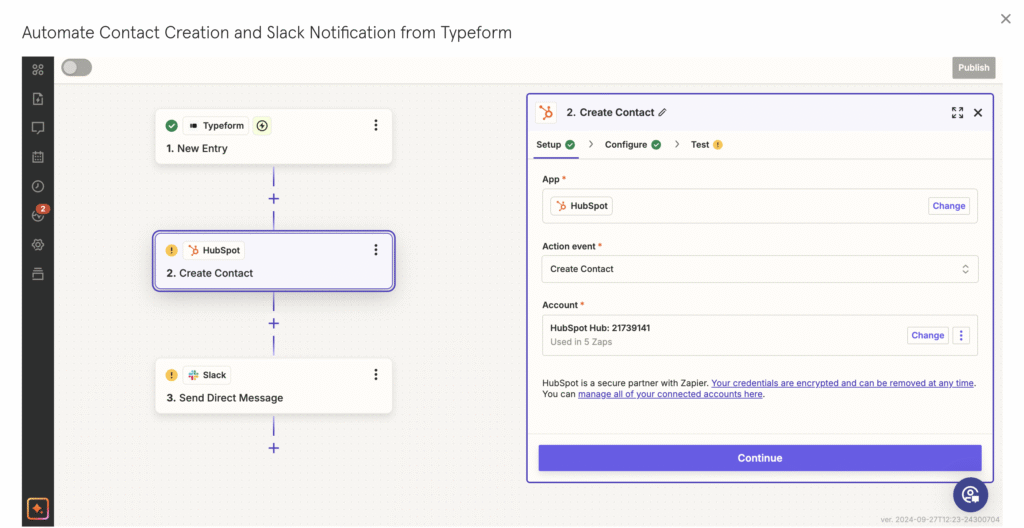
- Automation: Zapier + AI, Make.com
Include step-by-step labs:
“In 20 minutes, build an AI email responder for customer FAQs.”
5. Assess with Real Business Challenges
Replace quizzes with applied projects:
- “Audit your department for AI opportunities”
- “Design an AI implementation plan for your company”
- “Present an AI ethics policy to your leadership team”
Offer peer reviews or mentor feedback to deepen learning.
FAQs
Q: Who is the ideal audience for this course?
A: Mid-level managers, entrepreneurs, consultants, and business analysts—anyone who makes decisions but isn’t a data scientist.
Q: Do I need to teach coding or machine learning?
A: No. Focus on AI literacy and tool fluency. Use no-code platforms to demonstrate concepts without technical barriers.
Q: How long should the course be?
A: 4–6 weeks (2–3 hours/week) works well for working professionals. Offer a self-paced option with lifetime access.
A great “AI in Business” course doesn’t create AI experts—it creates AI-savvy leaders who can ask the right questions, evaluate solutions critically, and drive responsible innovation. By focusing on real problems, practical tools, and ethical guardrails, your course becomes more than education—it becomes a catalyst for transformation. Start with impact, keep it human, and let AI be the enabler—not the star.