

Business writing is everywhere: client emails, project reports, sales proposals, internal memos, and marketing copy. Poorly written messages waste time, confuse stakeholders, and damage credibility. AI writing tools change that—helping you draft faster, edit smarter, and communicate with precision. The key? Use AI as a collaborative editor, not a ghostwriter. Here’s how to apply AI effectively across common business writing tasks.
1. Draft Faster with AI-Powered Outlines & First Drafts
Staring at a blank page? AI jumpstarts your writing:
- Prompt: “Write a 3-paragraph project update for executives: Q2 progress on CRM migration, key risks, next steps.”
- Tools like Microsoft Copilot, Jasper, or Notion AI generate structured drafts in seconds.
- Pro tip: Always feed AI context—your brand voice, audience, and key points—to get relevant output.
Use AI for the “skeleton,” then inject your expertise and nuance.
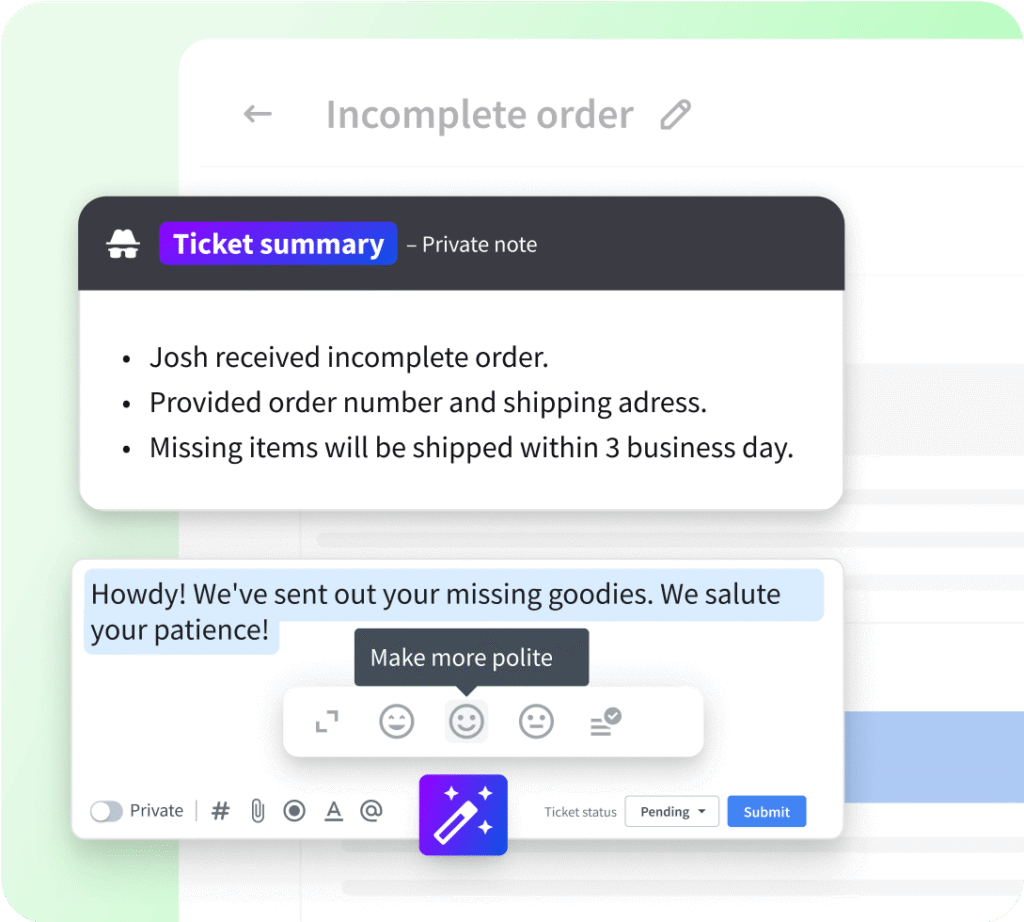
2. Edit for Clarity, Tone, and Professionalism
AI catches what you miss:
- Grammarly or ProWritingAid flags passive voice, jargon, and tone mismatches (e.g., “Too casual for a client proposal”).
- Hemingway Editor highlights complex sentences—ideal for making reports skimmable.
- Microsoft Editor (in Word/Outlook) suggests conciseness: “Replace ‘utilize’ with ‘use’.”
Result: Clearer, more persuasive writing that builds trust.
3. Personalize at Scale for Sales & Marketing
Generic = ignored. AI helps you tailor messages without manual effort:
- Email outreach: Tools like Copy.ai or Phrasee generate dozens of subject line variants and personalize body copy using CRM data.“Hi [Name], saw your post on sustainable packaging—our new biodegradable mailers might interest you.”
- Social posts: Lately or Buffer AI turns a blog link into platform-optimized captions (LinkedIn vs. Twitter tone).
This boosts engagement while saving hours.

4. Ensure Consistency Across Teams
Maintain brand voice company-wide:
- AI style guides: Tools like Writer.com or Acrolinx enforce tone, terminology, and formatting rules in real time.
- Example: Auto-correct “guys” → “team” or “cheap” → “affordable.”
- Template libraries: Store AI-assisted templates for common docs (e.g., “Client Onboarding Email,” “Quarterly Report”) so everyone starts strong.
This reduces revision cycles and strengthens brand perception.
5. Summarize & Repurpose Content
Turn long docs into actionable snippets:
- AI summarizers (like TldrThis or Microsoft Copilot) condense meeting notes, research, or reports into bullet points.
- Repurpose a whitepaper into LinkedIn posts, email snippets, and slide decks using Jasper or Copymatic.
Maximize ROI on every piece of content you create.
FAQs
Q: Will AI make my writing sound robotic?
A: Only if you don’t edit it. Always review, refine, and add human touches—anecdotes, empathy, or strategic emphasis. AI drafts; you connect.
Q: Are AI writing tools secure for confidential business info?
A: Avoid public AI tools (like free ChatGPT) for sensitive data. Use enterprise-grade tools (Grammarly Business, Microsoft Copilot for Microsoft 365) with data encryption and compliance (GDPR, SOC 2).
Q: Which tool should I try first?
A: Start with what you already use:
- Microsoft 365 users: Try Copilot in Word/Outlook (included in E3/E5 plans)
- Google Workspace: Use Grammarly or Wordtune
- Marketers: Test Copy.ai (free tier available)
AI in business writing isn’t about replacing your voice—it’s about amplifying your impact. By handling the heavy lifting of drafting, editing, and scaling, AI frees you to focus on strategy, relationship-building, and the human elements that no algorithm can replicate. Use it wisely, edit thoughtfully, and watch your communication become clearer, faster, and more compelling.