

Meta AI is now rolling out as a built-in assistant across Meta’s ecosystem—including WhatsApp. For WhatsApp Business users, this means a powerful, no-cost AI tool that can handle common customer questions, provide instant support, and free up your team’s time—without needing third-party bots or complex setups. Here’s how to use Meta AI in your WhatsApp Business account effectively and responsibly.
⚠️ Note: As of mid-2024, Meta AI is being gradually rolled out to WhatsApp users globally. Availability depends on your region, device, and account type.
1. Enable Meta AI in Your WhatsApp Business App
Meta AI appears as a dedicated contact in your WhatsApp chat list (labeled “Meta AI”). To use it for your business:
- Update WhatsApp: Ensure you’re on the latest version of WhatsApp Business (iOS or Android).
- Opt in: If prompted, tap “Try Meta AI” when it appears in your chat list.
- Business accounts: Meta AI works on WhatsApp Business app (for small businesses) and will eventually integrate with the WhatsApp Business Platform (API) for larger enterprises.
🔒 Privacy: Meta states that chats with Meta AI are not used to train its models if you’re logged into a WhatsApp Business account. Business data remains protected.
2. Use Meta AI to Answer Common Customer Questions
Customers can now message your business number and get instant AI-powered replies—even outside business hours:
- A customer asks: “What are your store hours?”
→ Meta AI scans your Business Profile (which you set in WhatsApp Business settings) and replies:“Open Mon–Sat, 9 AM–7 PM. Closed Sundays.” - A customer asks: “Do you deliver to Brooklyn?”
→ If you’ve added service areas to your profile, Meta AI responds accurately.
How to prepare:
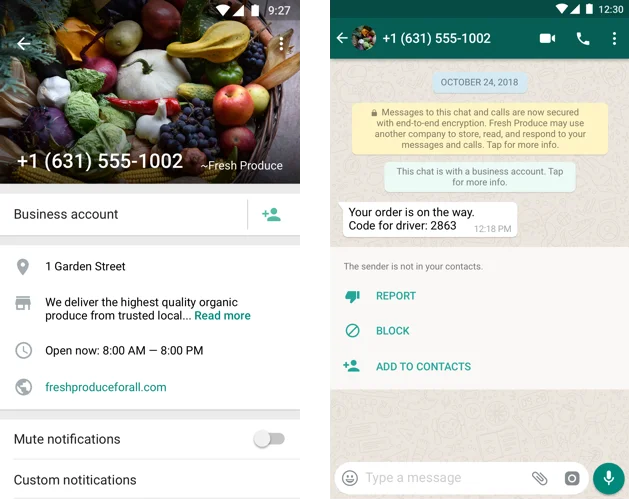
✅ Go to WhatsApp Business > Settings > Business Profile
✅ Fill in:
- Business description
- Hours
- Address & service areas
- Email & website
- Product catalog (if applicable)
The richer your profile, the smarter Meta AI’s responses.
3. Enhance (Don’t Replace) Human Support
Meta AI is designed to assist—not replace—your team:
- It handles simple, factual queries (hours, location, basic product info).
- For complex or sensitive issues (complaints, custom orders), it won’t intervene—your human agents take over.
- You retain full control: Meta AI only responds based on your public business info—not private chats or CRM data.
🚫 Meta AI cannot:
- Access your customer database
- Process payments
- Send promotional messages
- Replace custom chatbots built via WhatsApp Business API
4. Combine with WhatsApp Business Tools for Greater Impact
While Meta AI handles basic FAQs, pair it with other WhatsApp Business features:
- Quick Replies: Save templated responses for frequent questions (e.g., return policy).
- Labels: Tag chats (e.g., “Pending,” “Resolved”) for better organization.
- Away Messages: Set auto-replies when offline—complementing Meta AI’s 24/7 presence.
For advanced automation (lead qualification, CRM sync, payments), you’ll still need the WhatsApp Business Platform (API) with a solution provider like Twilio or Respond.io.
5. Best Practices for Using Meta AI
- Keep your Business Profile updated—AI is only as good as your data.
- Monitor conversations to ensure AI responses align with your brand voice.
- Train your team to take over when AI reaches its limits.
- Never share sensitive info—remind customers to avoid sending passwords or payment details in chat.
FAQs
Q: Is Meta AI available on WhatsApp Business API (for large companies)?
A: Not yet. As of 2024, Meta AI is only available on the WhatsApp Business app (for SMBs). API integration is expected in future updates.
Q: Can I customize Meta AI’s responses or brand its voice?
A: No. Meta AI uses a neutral, helpful tone and pulls only from your public Business Profile. You cannot inject custom scripts or marketing messages.
Q: Does using Meta AI cost extra?
A: No. Meta AI is free and built into WhatsApp—no subscription or setup fees.
Meta AI in WhatsApp Business is a game-changer for small businesses: it delivers instant, accurate responses 24/7 using the info you’ve already provided. While it won’t replace full-featured chatbots for complex workflows, it’s a powerful first line of support that boosts responsiveness and customer satisfaction—right out of the box.
Next step: Open your WhatsApp Business app, update your Business Profile, and start letting Meta AI handle the basics—so you can focus on what matters most: growing your business.