

We’re moving into a world where Artificial Intelligence isn’t just a tool—it’s the interface through which we interact with our digital environment.
1. Use AI as Your Command Center
What it does:
Instead of clicking menus and buttons, use AI to launch apps, open files, and perform searches using natural language.
How to use it:
- Ask ChatGPT , Google Gemini , or Microsoft Copilot :”Open my email app and show me unread messages from clients.”
“Find all files related to ‘Project Alpha’ created this week.”
📝 Tip: Combine AI with voice assistants like Siri, Alexa, or Google Assistant for hands-free control.

2. Automate Repetitive Tasks with AI Commands
What it does:
AI acts like a digital command line, automating repetitive tasks across platforms.
How to use it:
- Use Zapier , Make.com , or Microsoft Power Automate + AI to:
- Automatically file documents based on content
- Schedule social media posts based on trending topics
- Generate meeting notes from transcripts
📌 Best for: Entrepreneurs, remote workers, and automation lovers.
3. Search & Organize Files Using Natural Language
What it does:
Forget digging through folders—use AI to find exactly what you need by describing it.
How to use it:
- Ask AI:”Show me the latest budget report I worked on.”
“Find all documents about customer feedback from last month.” - Use Microsoft Windows Copilot , MacOS AI Search , or Notion AI to query your digital life.
💡 Bonus: This works best when you tag and organize files clearly.
4. Schedule Your Day with Voice or Text Prompts
What it does:
Treat AI like a personal scheduler—it understands context and updates your calendar, to-do list, and habits automatically.
How to use it:
- Ask AI:”Add a meeting with John tomorrow at 3 PM.”
“Remind me to follow up with Sarah after lunch.” - Use tools like Reclaim.ai , Motion , or ClickUp AI Scheduler to auto-schedule tasks.
📌 Best for: Busy professionals, managers, and multitaskers.
5. Interact with Apps Through AI Queries
What it does:
Instead of navigating complex software, use AI to interact directly with your apps.
How to use it:
- In Notion , ask:”Create a new project page for ‘Product Launch’ with deadlines and team members.”
- In Slack , say:”Summarize yesterday’s channel activity in the marketing team.”
- In Excel , try:”Generate a chart comparing Q1 and Q2 sales.”
📝 Tip: More apps are adding AI interfaces every day—stay updated!
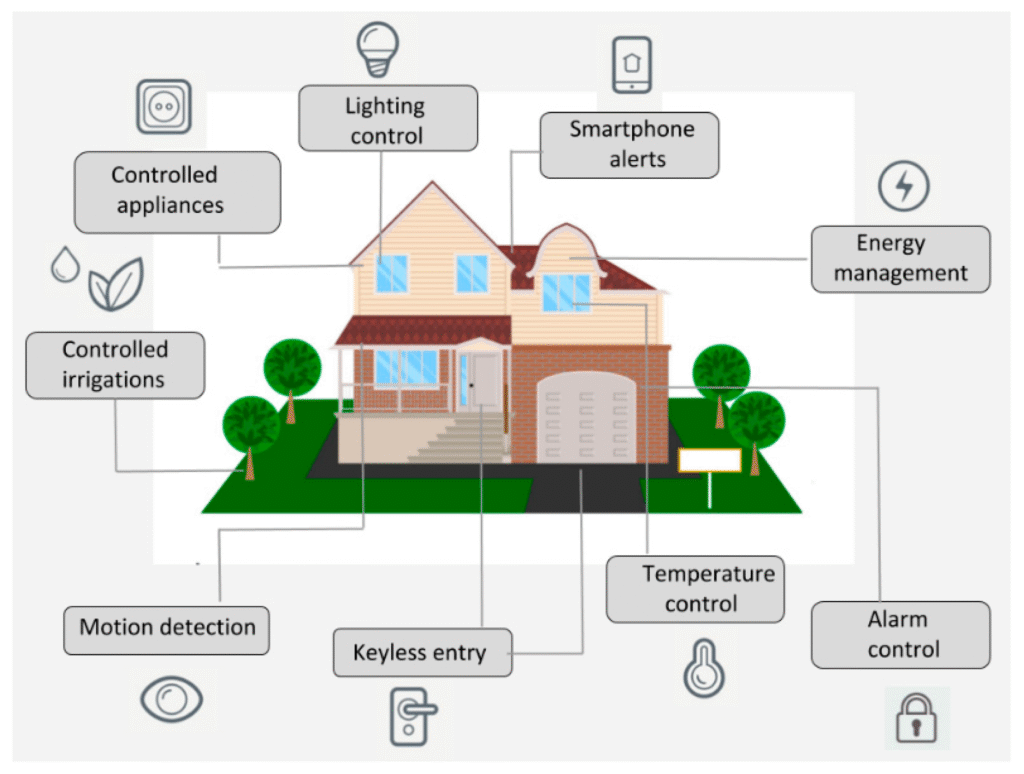
6. Control Your Smart Home & Devices with AI
What it does:
Your AI becomes the central hub for managing not just digital tasks, but also physical devices around you.
How to use it:
- Use Google Assistant , Apple Shortcuts + Siri , or Alexa + AI to:
- Turn off lights and adjust thermostats
- Play music or podcasts
- Set alarms and routines
- Control security cameras and locks
Popular Tools That Help You Use AI Like an OS
| Tool | Function |
|---|---|
| Microsoft Copilot (Windows) | AI assistant built into Windows 11/12 |
| Apple Intelligence (iOS 18+) | Deep integration with iOS apps and Siri |
| ChatGPT / Gemini | General-purpose AI assistant for queries and commands |
| Notion AI | Query databases, generate summaries, and manage tasks |
| Zapier / Make.com | Automate workflows between apps using AI logic |
| Voice Assistants (Siri, Alexa, Google Assistant) | Hands-free AI OS control |
Want more tips on using AI like an operating system and staying ahead of the curve? Subscribe to our newsletter and get weekly updates delivered straight to your inbox!